Intercepting HTTPS Traffic: A Deep Dive with jSSLKeyLog and Wireshark
Digging Up the Master Secret: Decrypting TLS in Spring Boot
In the world of network forensics, HTTPS is often a dead end. You fire up Wireshark, filter for your traffic, and find nothing but a wall of Encrypted Application Data. If you are a Java developer, the standard advice is to use -Djavax.net.debug=all, which leaves you drowning in thousands of lines of hex dumps in your console—hardly a surgical tool.
But what if we could take the symmetric keys directly from the JVM and feed them to Wireshark? Today, we are going to use jSSLKeyLog to perform a live excavation of encrypted traffic between two Spring Boot services.
The Lab: 2 Spring Boot Services
To demonstrate this, we have a classic local setup:
- The Vault (Server): An HTTPS-secured service running on port
8443. - The Fetcher (Client): A simple service that requests a JSON payload from the Vault.
Even though they communicate on localhost, the traffic is wrapped in TLS 1.3. To Wireshark, this looks like noise. To us, it’s just a layer of dirt we need to remove.
Step 1: The Tools
We aren’t going to modify a single line of code. Instead, we use a Java Agent.
- jSSLKeyLog: A small JAR that hooks into the JVM’s
JSSE(Java Secure Socket Extension). It captures theCLIENT_RANDOMand the session keys before they are used to encrypt the traffic.
The Command
To start the experiment, we launch our client with the following arguments:
java -javaagent:jSSLKeyLog.jar==tls-keys.log \
     -Djavax.net.ssl.trustStore=keystore.p12 \
     -Djavax.net.ssl.trustStorePassword=password \
     -jar fetcher-client.jar
Note the double equals (==): the first part is the path to the agent, the second is where the “secrets” will be buried (our log file).
Step 2: Uncovering the Identity
Before we get to the data, we have to deal with the handshake. In our first sample of data, we see Frame 155.
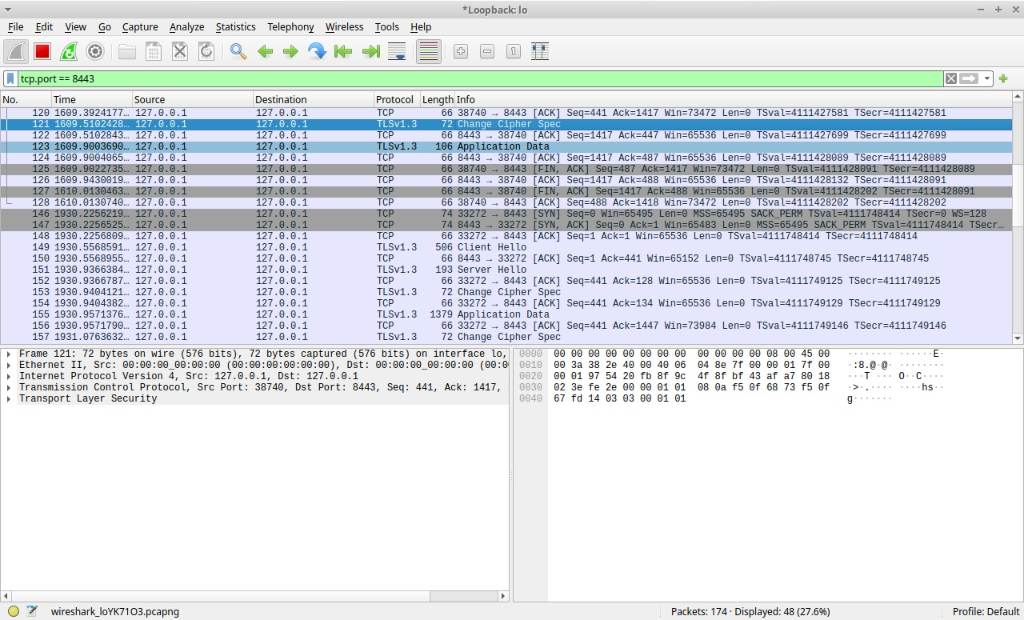
By pointing Wireshark to our tls-keys.log (Preferences > Protocols > TLS), the junk begins to take shape. In the Decrypted TLS tab, we can now see the server’s “Identity Card”—the SSL Certificate.
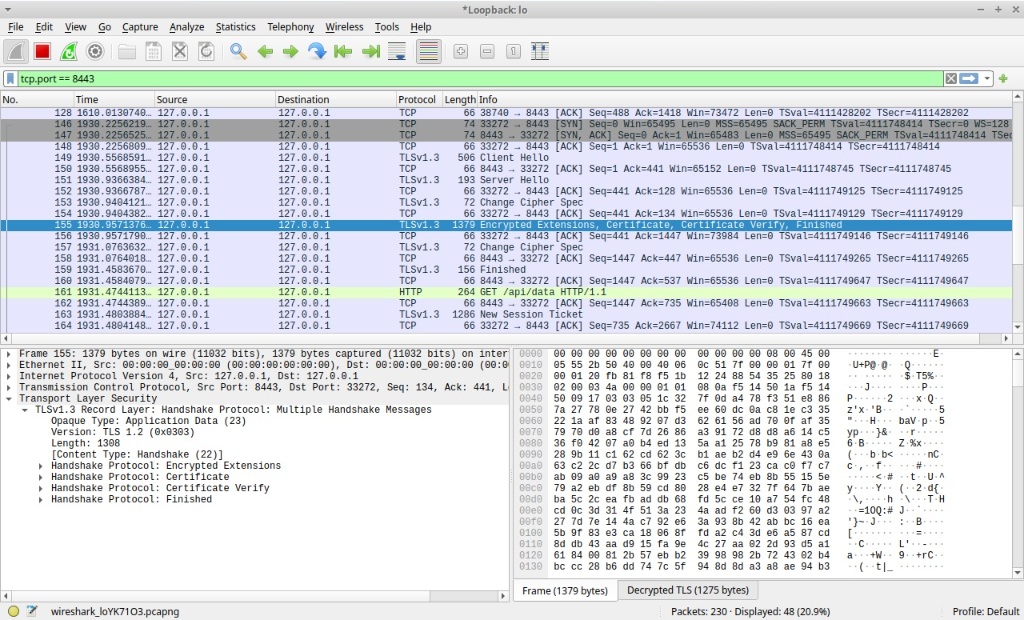
Observation: Look at the hex dump. Amidst the binary, readable strings appear: IT-Digger, Kyiv, localhost. The tunnel is being cracked open.
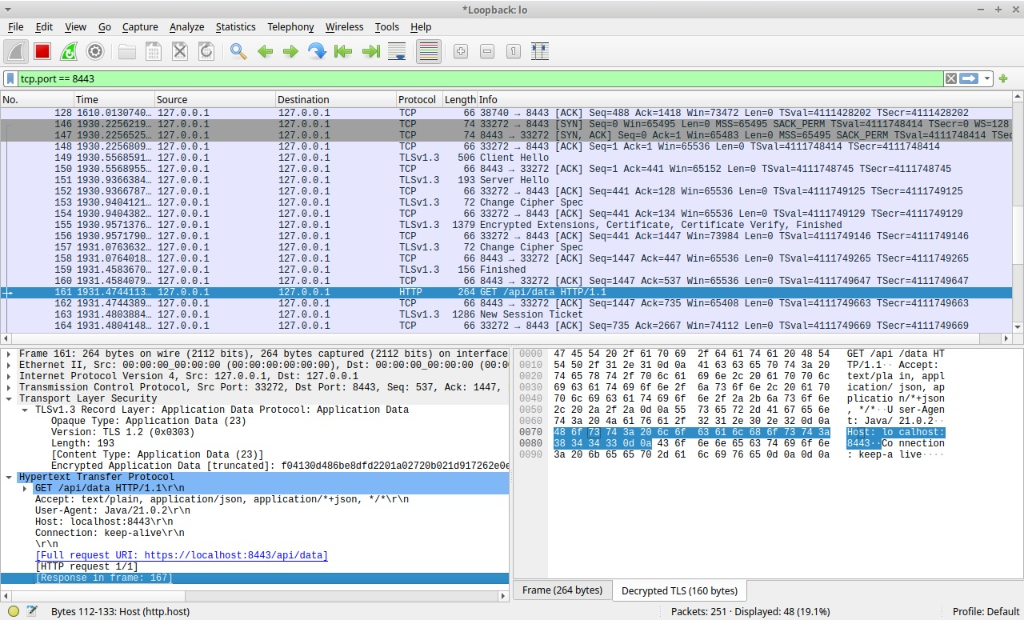
See the blue text that says: [Response in frame: 167]?
Step 3: The Payload
The real treasure is the application data. In Frame 161, we see a GET /api/data request. But the real value is in the response (Frame 167).
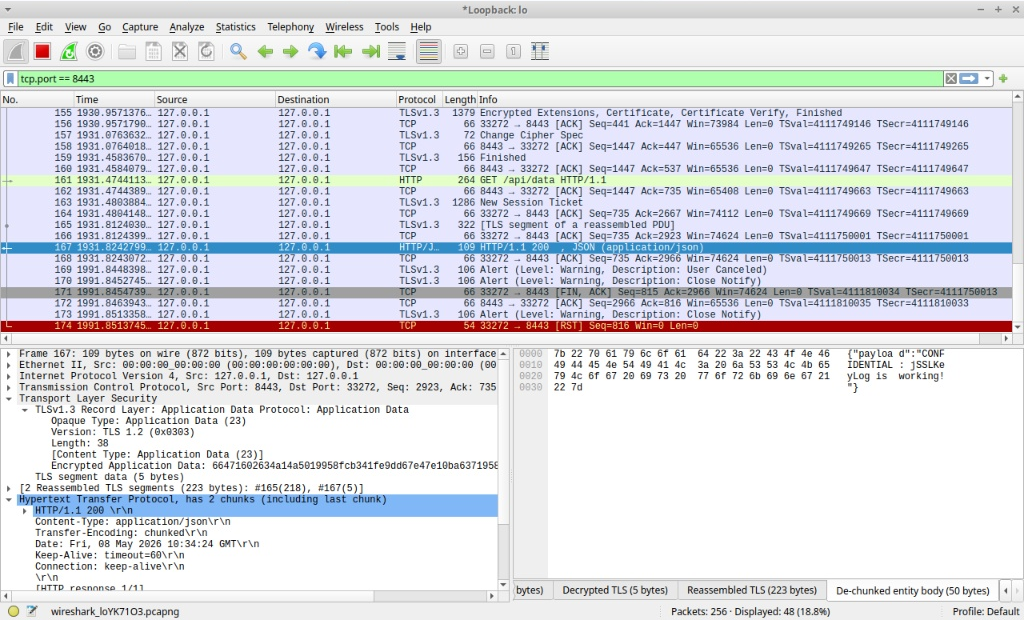
Because we are using Spring Boot, the response is often sent in chunks. Wireshark, now equipped with our session keys, reassembles these chunks and reveals the raw JSON payload in the De-chunked entity body tab:
{
  "payload": "CONFIDENTIAL: jSSLKeyLog is working!"
}
The Findings
Java is a Black Box no more: While browsers like Chrome respect the SSLKEYLOGFILE environment variable, Java requires an agent to reveal its secrets.
Handshakes are the map: Decrypting the handshake (Frame 155) proves the keys are correct before you even see the data.
Real-world forensics: This technique is invaluable for debugging production-like issues locally without disabling security headers or reverting to plain HTTP.
Safety Warning: Never leave these keys lying around. The tls-keys.log file is literally the “key to everything for that session. Use it for debugging, then delete it.
Lab source
Server
package com.example.server;

import org.springframework.boot.SpringApplication;
import org.springframework.boot.autoconfigure.SpringBootApplication;
import org.springframework.web.bind.annotation.GetMapping;
import org.springframework.web.bind.annotation.RestController;
import java.util.Collections;
import java.util.Map;

@SpringBootApplication
public class VaultApplication {
    public static void main(String[] args) {
        SpringApplication.run(VaultApplication.class, args);
    }
}

@RestController
class SecretController {
    @GetMapping("/api/data")
    public Map<String, String> getSecretData() {
        return Collections.singletonMap("payload", "CONFIDENTIAL: jSSLKeyLog is working!");
    }
}
Client
package com.example.client;

import org.springframework.boot.CommandLineRunner;
import org.springframework.boot.SpringApplication;
import org.springframework.boot.autoconfigure.SpringBootApplication;
import org.springframework.context.annotation.Bean;
import org.springframework.web.client.RestTemplate;

@SpringBootApplication
public class FetcherApplication {
    public static void main(String[] args) {
        SpringApplication.run(FetcherApplication.class, args);
    }

    @Bean
    public CommandLineRunner run() {
        return args -> {
            RestTemplate restTemplate = new RestTemplate();
            String url = "https://localhost:8443/api/data";
            try {
                System.out.println("--- Sending HTTPS Request to Vault ---");
                String response = restTemplate.getForObject(url, String.class);
                System.out.println("Decrypted Response: " + response);
            } catch (Exception e) {
                System.err.println("Request failed: " + e.getMessage());
                System.err.println("Note: You must trust the self-signed cert or disable validation.");
            }
        };
    }
}
jSSLKeyLog: https://jsslkeylog.github.io/